⭐ 스윙
Swing
자바에서 GUI를 만들어주는 도구
⭐ 스윙의 JComponent
JFrame
JPanel
Jbutton
등등...
화면과 관련된 작업을 할때
배치관리자 Layout을 이해해야 한다.
Component 들을 어떻게 배치할 것인지
⭐동서남북 배치
배치관리자 개념중에
보더레이아웃이라는 개념이 있다.
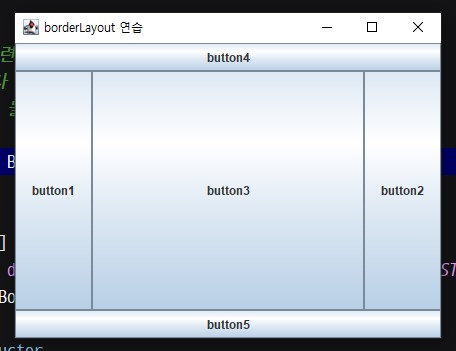
BorderLayout은 컴포넌트를
동서남북 가운데로 배치하는 레이아웃이다.
프레임 (패널)
우리가 생성한 JButton 객체를
프레임에 붙인다.
add(buttons[i], directions[i]);
예제) 보더레이아웃과 배열 응용
package _swing;

import javax.swing.*;
import java.awt.*;

/**
 * 4.28
 * 화면과 관련된 작업을 할때
 * 배치관리자 Layout을 이해해야 한다.
 * Component 들을 어떻게 배치할 것인지
 */
public class BorderLayoutEx extends JFrame {

    //member
    JButton[] buttons;
    String[] directions = {BorderLayout.WEST, BorderLayout.EAST, BorderLayout.CENTER,
            BorderLayout.NORTH, BorderLayout.SOUTH};

    //constructor
    public BorderLayoutEx() {
        setTitle("borderLayout 연습");
        setSize(600, 600);
        setVisible(true);
        setDefaultCloseOperation(JFrame.EXIT_ON_CLOSE);

        initData(); // 1번
        setInitLayout();// 2번 서순 주의
    }

    //method
    private void initData() {
        buttons = new JButton[5];

        for (int i = 0; i < buttons.length; i++) {
            buttons[i] = new JButton("button" + (i + 1));
        }
//        buttons[0] = new JButton("button1");
//        buttons[1] = new JButton("button2");
//        buttons[2] = new JButton("button3");
//        buttons[3] = new JButton("button4");
//        buttons[4] = new JButton("button5");
    }

    private void setInitLayout() {
        /*
        배치관리자 개념중에
        보더레이아웃이라는 개념이 있다.
        BorderLayout은 컴포넌트를
        동서남북 가운데로 배치하는 레이아웃이다.
         */
        setLayout(new BorderLayout());
        /*
        프레임 (패널)
        우리가 생성한 JButton 객체를
        프레임에 붙인다.
         */

        for (int i = 0; i < 5; i++) {
            add(buttons[i], directions[i]);
        }
//        add(buttons[0], {BorderLayout.WEST);
//        add(buttons[1], {BorderLayout.EAST);
//        add(buttons[2], {BorderLayout.CENTER);
//        add(buttons[3], {BorderLayout.NORTH);
//        add(buttons[4], {BorderLayout.SOUTH);
    }

    //main thread - 테스트 코드 작성
    public static void main(String[] args) {

        BorderLayoutEx borderLayoutEx = new BorderLayoutEx();

    }//end of main

}//end of class
⭐수평, 수직으로 배치
배치관리자 FlowLayout
컴포넌트들을 수평, 수직으로 배치
예제) 수평 수직 배치
package _swing;

import javax.swing.*;
import java.awt.*;

/**
 * 4.28
 * 배치관리자 FlowLayout
 * 컴포넌트들을 수평, 수직으로 배치
 */
public class MyComponents extends JFrame {

    //member - 가장 많이 쓰이는 기능들
    private JButton button;
    private JLabel label;
    private JTextField textField;
    private JPasswordField passwordField;
    private JCheckBox checkBox;

    //constructor
    public MyComponents() {

        initData();
        setInitLayout();
    }

    //method
    private void initData() {
        setTitle("컴포넌트 확인");
        setSize(800,800);
        setDefaultCloseOperation(JFrame.EXIT_ON_CLOSE);
        setVisible(true);

        button = new JButton("JButton");
        label = new JLabel("글자를 띄우는 컴포넌트");
        textField = new JTextField("아이디를 입력하세요", 30);
        passwordField = new JPasswordField("비밀번호를 입력하세요", 40);
        checkBox = new JCheckBox("동의");

    }
    // JFrame 의 배치관리자를 결정해주는 메서드 (레이아웃)
    private void setInitLayout() {
        setLayout(new FlowLayout(FlowLayout.LEFT,30,30));

        //프레임에 붙여넣기
        add(button);
        add(label);
        add(textField);
        add(passwordField);
        add(checkBox);
    }

    //main thread - 테스트 코드 작성
    public static void main(String[] args) {

        MyComponents myComponents = new MyComponents();

    }//end of main

}//end of class

⭐좌표값으로 배치
배치관리자 설정을 아무것도 안하면
또는 null값을 세팅하면
좌표 기준으로 배치할 수 있다.
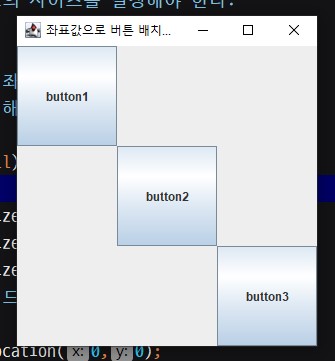
좌표 값으로 배치하려면
반드시 null 값을 입력하자
좌표값을 선택하려면
먼저 컴포넌트의 사이즈를 결정해야 한다.
그 다음
배치관리자가 좌표값이기 때문에
x,y 값을 지정해줘야 한다.
예제) 좌표값으로 배치
package _swing;

import javax.swing.*;

/**
 * 4.28
 * 배치관리자 설정을 아무것도 안하면
 * 또는 null값을 세팅하면
 * 좌표 기준으로 배치할 수 있다.
 */
public class NoLayoutEx01 extends JFrame{

    //member
    private JButton button1;
    private JButton button2;
    private JButton button3;

    //constructor
    public NoLayoutEx01() {

        initData();
        setInitLayout();
    }

    //method
    private void initData() {
        setTitle("좌표값으로 버튼 배치하기");
        setSize(316,339);
        setDefaultCloseOperation(JFrame.EXIT_ON_CLOSE);
        setVisible(true);

        button1 = new JButton("button1");
        button2 = new JButton("button2");
        button3 = new JButton("button3");
    }

    private void setInitLayout() {
        /*
        좌표 값으로 배치하려면
        반드시 null 값을 입력하자

        좌표값을 선택하려면
        먼저 컴포넌트의 사이즈를 결정해야 한다.

        그 다음
        배치관리자가 좌표값이기 때문에
        x,y 값을 지정해줘야 한다.
         */
        setLayout(null);

        button1.setSize(100,100);
        button2.setSize(100,100);
        button3.setSize(100,100);
        //setter 메서드

        button1.setLocation(0,0);
        button2.setLocation(100,100);
        button3.setLocation(200,200);

        //패널에 붙이기
        add(button1);
        add(button2);
        add(button3);
    }

    //main
    public static void main(String[] args) {

        new NoLayoutEx01();

    }//end of main

}//end of class
⭐ 패널
panel
기본 배치관리자로는 유연한 배치가 안되는 문제점
JPanel
패널을 여러개 나눈 다음
각 패널마다 배치관리자를 할당하는 방법이 있다.
GridLayout
루트패널의 그리드를 나누는 배치관리자: 예) 2행 1열
예제)패널별로 다른 배열 테스트
package _swing;

import javax.swing.*;
import java.awt.*;

/**
 * 4.28
 * 지금까지 배치관리자에 대해 알아봤다면
 * 기본 배치관리자로는 유연한 배치가 안되는 문제점
 *
 * JPanel
 * 패널을 여러개 나눈 다음
 * 각 패널마다 배치관리자를 할당하는 방법이 있다.
 *
 * GridLayout
 * 루트패널의 그리드를 나누는 배치관리자: 예) 2행 1열
 *
 */
public class MyPanelEx1 extends JFrame {

    //member
    private JButton button1;
    private JButton button2;
    private JButton button3;
    private JButton button4;

    /*
    패널을 사용하면
    컴포넌트들을 그룹화시킬 수 있다.
    각각의 배치관리자를 추가해 관리할 수 있다.
     */

    private JPanel panel1;
    private JPanel panel2;

    //constructor
    public MyPanelEx1() {

        initData();
        setinitLayout();
    }

    //method
    private void initData() {
        setTitle("패널연습해보기");
        setSize(500,500);
        setDefaultCloseOperation(JFrame.EXIT_ON_CLOSE);
        setVisible(true);

        panel1 = new JPanel();
        panel2 = new JPanel();

        button1 = new JButton("button1");
        button2 = new JButton("button2");
        button3 = new JButton("button3");
        button4 = new JButton("button4");

    }

    private void setinitLayout() {

        //루트패널에 그리드를 나누는 배치관리자: 2행 1열
        setLayout(new GridLayout(2,1));

        //패널1,2 디자인
        panel1.setBackground(new Color(49, 137, 151));
        panel2.setBackground(Color.black);

        //버튼1~4 디자인
        button1.setBackground(new Color(65,23,0));
        button2.setBackground(new Color(65,23,0));
        button1.setForeground(Color.white);
        button2.setForeground(Color.white);
        button1.setSize(100,75);
        button2.setSize(100,75);

        button3.setBackground(Color.white);
        button4.setBackground(Color.white);

        //루트패널에 패널 삽입
        add(panel1);
        add(panel2);

        /*
        패널에 버튼을 삽입
        배치관리자를 설정하지 않았따면 기본 배치관리자가 세팅된다.
         */
        panel1.add(button1);
        panel1.add(button2);
        panel2.add(button3);
        panel2.add(button4);

       // 패널1 배치관리자 설정
//        panel1.setLayout(new FlowLayout(FlowLayout.LEFT, 30, 30));

        /*
        panel1 <-- FlowLaout
        panel1 <-- null --> 컴포넌트 사이즈, 좌표값 ...
        null, flow
         */
        panel1.setLayout(null);
        button1.setLocation(30,0);
        button2.setLocation(160,0);

        //패널2 배치관리자 설정
        panel2.setLayout(new FlowLayout(FlowLayout.RIGHT, 30, 30));
    }

    //main - test code
    public static void main(String[] args) {

        MyPanelEx1 myPanelEx1 = new MyPanelEx1();

    }//end of main

}//end of class

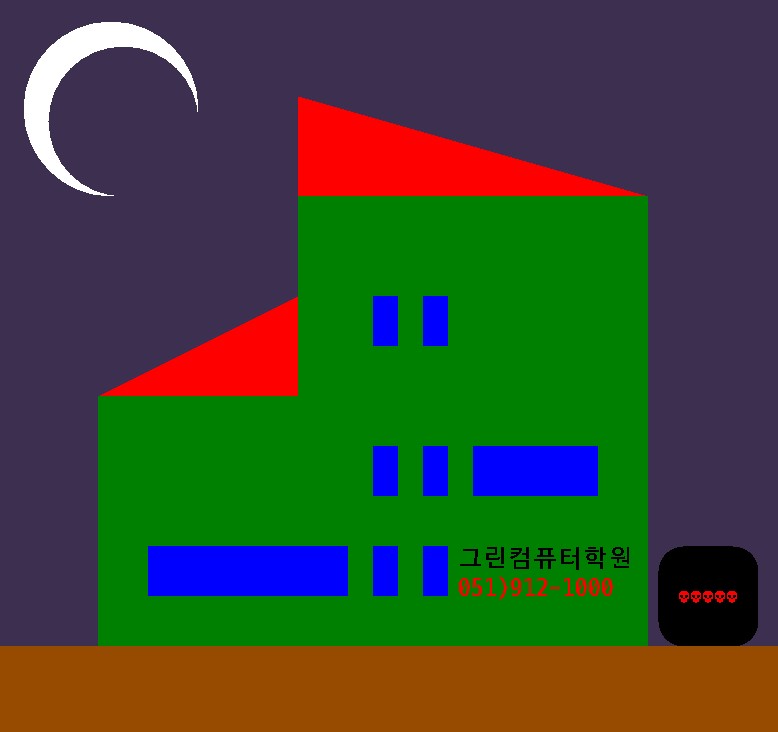
예제) 집 그리기
package _my.swing;

import javax.swing.*;
import java.awt.*;
/**
 * 4.28
 *
 * 집그리기
 * 멤버변수, 생성자, 메서드, 내부클래스, 메인
 *
 */
public class MyPaintFrame extends JFrame {

    //member
    private Mypanel mypanel;

    private JPanel panel1;
    private JPanel panel2;

    //cons
    public MyPaintFrame() {

        initData();
        setInitLayout();
    }

    //method
    private void initData() {
        setTitle("집그리기");
        setSize(800,800);
        setVisible(true);
        setDefaultCloseOperation(JFrame.EXIT_ON_CLOSE);

        mypanel = new Mypanel();

        panel1 = new JPanel();
        panel2 = new JPanel();

    }

    private void setInitLayout() {
        add(mypanel);
    }

    //inner
    static class Mypanel extends JPanel {

        @Override
        public void paint(Graphics g) {
            super.paint(g);
//            setBackground(new Color(189,230,249));
            setBackground(new Color(61,47,80));

            //네모
            g.setColor(new Color(0,128,0));
            g.fillRect(100,400,550,250);
            g.fillRect(300,200,350,200);
            g.setColor(new Color(150,75,0));
            g.fillRect(0,650,1000,500);


            //1층창
            g.setColor(Color.blue);
            g.fillRect(150,550,200,50);
            g.fillRect(375,550,25,50);
            g.fillRect(425,550,25,50);
            //2층창
            g.fillRect(475, 450,125,50);
            g.fillRect(425, 450,25,50);
            g.fillRect(375, 450,25,50);
            //3층창
            g.fillRect(425, 300,25,50);
            g.fillRect(375, 300,25,50);
            //원
            g.setColor(Color.white);
            g.fillOval(25,25,175,175);
            g.setColor(new Color(61,47,80));
            g.fillOval(50,50,150,150);
            //선
            g.setColor(Color.red);
//            g.drawLine(100,400,300,300);
//            g.drawLine(300,100,650,200);
//            g.drawLine(300,100,300,200);
            //삼각형
            int[] intX = {100,300,300};
            int[] intY = {400,300,400};
            g.fillPolygon(intX,intY,3);
            int[] intX2 = {300,300,650};
            int[] intY2 = {100,200,200};
            g.fillPolygon(intX2,intY2,3);
            //둥근네모
            g.setColor(Color.black);
            g.fillRoundRect(660,550,100,100,50,50);
            //글자
            g.setColor(Color.red);
            g.drawString("💀💀💀💀💀",680,605);
            g.setFont(new Font("d2coding",Font.BOLD,25));
            g.drawString("051)912-1000",460,600);
            g.setColor(Color.black);
            g.drawString("그린컴퓨터학원",460,570);

        }
    }//end of inner

    //main
    public static void main(String[] args) {

        MyPaintFrame myPaintFrame = new MyPaintFrame();

    }//end of main
}//end of class
'Java' 카테고리의 다른 글
| Swing예제, ActionListener로 버튼 상호작용 (0) | 2025.04.29 |
|---|---|
| Swing 예제, JLabel로 이미지 팝업하기 (0) | 2025.04.29 |
| 내부 클래스 Inner Class, 논리적으로 응집력 있는 클래스 설계 (1) | 2025.04.25 |
| 멀티 쓰레드 Multi Threading, 쓰레드 동시 수행... 동기화 처리가 중요 (0) | 2025.04.25 |
| 쓰레드 Thread, 작업을 수행하는 단위 (0) | 2025.04.25 |


