⭐예외처리
Exception
예상치 못한 상황, 예외를 처리하는 방법
이를 통해
💀 비정상 종료를 방지하고
💀 안정성과 신뢰성을 높일 수 있다.
How? 😃 try-catch 구문
why? 😒 사용자를 믿을 수 없기 때문
⭐finally 왜쓰는지?
자원해제를 위해..
💀 프로그램이 점점 느려지는 메모리 누수 방지
⭐ throw
예외를 강제로 발생시킨다
⭐ throws
메서드안에서 예외를 발생시킨다.
예외처리 예제1)
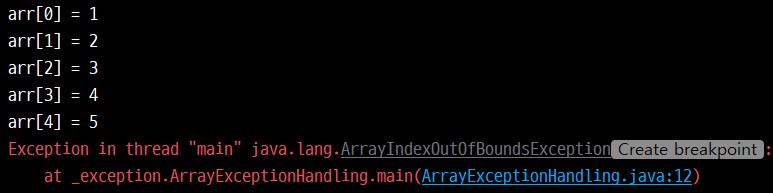
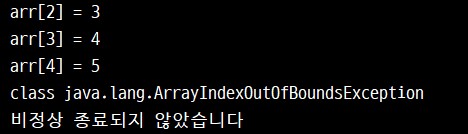
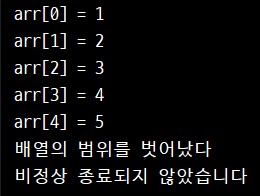
배열을 초과하는 예외를 발생시킨 뒤
이를 try - catch 구문으로 처리했다.
package _exception;
/**
 * 4.24
 * 예외처리 연습
 */
public class ArrayExceptionHandling {

    //main
    public static void main(String[] args) {

        //배열길이4, 인덱스길이5
        int[] arr = {1, 2, 3, 4, 5};

        /*
        예외처리

        try-catch
        try-catch-finally

        구문의 이해
         */
        try {
            // try 예외가 발생할 가능성이 있는 코드를 넣어준다
            for (int i = 0; i < 10; i++) {
                System.out.println("arr[" + i + "] = " + arr[i]);
            }
        } catch (ArrayIndexOutOfBoundsException e1) { //배열 초과 예외 코드
            System.out.println("배열의 범위를 벗어났다");

        } catch (Exception e2) {
            System.out.println(e2.getClass());

            // catch 예외가 발생했다면 예외처리 코드를 넣어준다
//            System.out.println("예외처리 - " + e.getMessage());

        }//end of try-catch

        System.out.println("비정상 종료되지 않았습니다");

    }//end of main
}//end of AEH
예외처리 예제2)
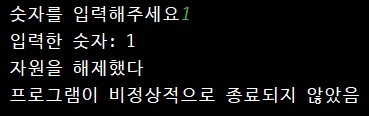
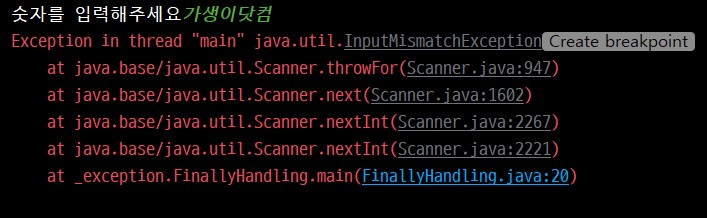
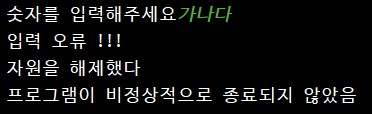
try-catch-finally 구문을 사용해봤다.
package _exception;
/**
 * 4.24
 * 예외처리 연습
 */
import java.util.Scanner;

public class FinallyHandling {

    //main
    public static void main(String[] args) {

        /*
        try-catch-finally

         */
        Scanner scanner = new Scanner(System.in);

        try {
            System.out.print("숫자를 입력해주세요");
            int result = scanner.nextInt();
            System.out.println("입력한 숫자: " + result);

//            return;

        } catch (Exception e) {
            System.out.println("입력 오류 !!!");
        } finally {
            /*
            finally 반드시 수행돼야 하는 코드를 입력한다.
            심지어 return 키워드를 넣어도 finally 수행이 된다.
             */
            scanner.close(); //스트림을, 자원을 해제한다.
            System.out.println("자원을 해제했다");
        }

        System.out.println("프로그램이 비정상적으로 종료되지 않았음");

    }//end of main
}
예외처리 예제3)
throw 구문을 이용해
예외를 일부러 발생시킬 수 있다.
package _exception;
/**
 * 4.24
 * throw
 * 예외클래스 직접 생성해서 발생시키기
 */
public class ThrowHandling {

    //main
    public static void main(String[] args) {

        boolean flag = true;

        if (flag) {
            /*필요에 의해
            직접 미리만든 예외 클래스를 생성할 수도 있다.
            new ArithmeticException();
             */
            throw new ArithmeticException(); // 향후 많이 쓰게 될 것

        }//end of if

    }//end of main
}//end of class

예외처리 예제4)
throws 구문을 이용해
메서드 안에서 예외를 발생시켜 봤다.
package _exception;
/**
 * 4.24
 * 예외처리 throws
 * 예외처리 던지기(미루기)
 */
public class Throws {

    //main
    public static void main(String[] args) {

        Calc calc = new Calc();

//        try {
//            int result = calc.divide(10, 0);
//            System.out.println("result: " + result);
//
//        } catch (Exception e) {
//            System.out.println(e.getClass());
//            System.out.println("에러발생");
//        }

        try {
            calc.divide(10, 0);
        } catch (Exception e) {
            System.out.println("인수로 0을 넣지 마시오");
        }


    }//end of main
}//end of class

class Calc {

    /*
    예외가 발생할 수 있는 코드에서
    직접 예외처리를 할 수 도 있지만

    사용하는 시점에
    알아서 적절하게 예외처리를 던질 수 있다.
     */
    public int divide(int n1, int n2) throws ArithmeticException, Exception {
        //이렇게 throws를 여러개 던질 수도 있다 - 강제성

        return n1 / n2;
    }

}//end of Calc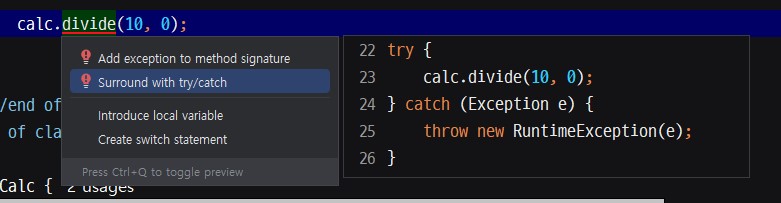

예외처리 예제5)
사용자정의 예외를 만들고 이를 테스트해봤다.
DivideByZeroException이라는 클래스를 만들고
Exception을 상속했다.
또한 예외처리시 고유 메시지가 뜨도록 만들어봤다.
package _exception;
/**
 * 4.24
 * 사용자정의 예외클래스 만들기
 */
public class DivideByZeroException extends Exception { //예외 클래스 상속

    private String message;

    public DivideByZeroException(String message) {
        super(message);
        this.message = message;
    }

    @Override
    public String getMessage() {
        return message;
    }

}//end of class
코드 실행부
package _exception;
/**
 * 4.24
 * 사용자정의 예외클래스 만들기
 */
public class ExceptionTest1 {
    //main
    public static void main(String[] args) {
        /*
        사용자정의 예외클래스 사용해보기
         */
        int result = 0;

        Calc2 calc2 = new Calc2();
        try {
            calc2.divide(10, 0);
        } catch (DivideByZeroException e) {
            throw new RuntimeException(e);
        }

    }//end of main
}//end of class

class Calc2 {

    public int divide(int n1, int n2) throws DivideByZeroException {
        int result = 0;

        try {
            result = n1/ n2;

        } catch (Exception e) {
            //사용자정의 예외클래스 사용해보기
            throw new DivideByZeroException("0으로 나누지 마시오");
        }
        return result;
    }

}// end of Calc2

'Java' 카테고리의 다른 글
| 멀티 쓰레드 Multi Threading, 쓰레드 동시 수행... 동기화 처리가 중요 (0) | 2025.04.25 |
|---|---|
| 쓰레드 Thread, 작업을 수행하는 단위 (0) | 2025.04.25 |
| 문자열 String 과 StringBuffer, 특별한 클래스 (0) | 2025.04.24 |
| 자바 API 문서, 보는 습관을 들이자 (0) | 2025.04.24 |
| 오브젝트 Object 클래스, 자동으로 상속되는 최상위 클래스 (0) | 2025.04.24 |


