배열이란?
연관된 데이터 타입의 요소들을
통으로 관리하기 위해 사용하는 자료구조
package com.array;
/**
 * 4.18 1강 배열 복습
**/
/*
배열이란?
연관된 데이터 타입의 요소들을
통으로 관리하기 위해 사용하는 자료구조
 */
public class IntArrayCRUD {
    //main
    public static void main(String[] args) {
        /*
        1. 생성(Create) - C

        배열은 반드시 크기(길이)를 지정해야 한다.
        인덱스 번호를 통해 각 요소를 찾을 수 있다.
        모든 인덱스 번호는 0 부터 시작한다.
         */
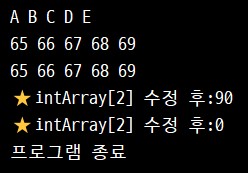
        int[] intArray = new int[5]; // [0][1][2][3][4] - 배열길이5, 인덱스길이4

        //배열은 반복문과 잘 사용된다.
        for (int i = 0; i < intArray.length; i++) {
            intArray[i] = i + 65;
            System.out.print((char)intArray[i] + " ");
        }
        System.out.println();
        /*
        2. 조회 (Read) - R
         */
        for (int i = 0; i < intArray.length; i++) {
            System.out.print(intArray[i] + " ");
        }
        System.out.println();
        System.out.print(intArray[0] + " ");
        System.out.print(intArray[1] + " ");
        System.out.print(intArray[2] + " ");
        System.out.print(intArray[3] + " ");
        System.out.print(intArray[4] + " ");
        System.out.println();
        //System.out.print(intArray[5]); // Array idex out of bounds exepcion
        //TODO 방어적 코드 고려
        /*
        3. 수정 (Update) - U
         */
        intArray[2] = 90;
        System.out.println("⭐intArray[2] 수정 후:" + intArray[2]); // 90
        /*
        4. 삭제 (Delete) - D

        배열은 고정 길이 이므로
        특정 인덱스를 0으로 초기화
        (int 이기 때문에)
        논리적으로 삭제한다
         */
        intArray[2] = 0;
        System.out.println("⭐intArray[2] 수정 후:" + intArray[2]); // 0

        System.out.println("프로그램 종료");
    }//end of main
}//end of class
배열 자료구조
CRUD개념
스캐너
등을 활용해 도서 관리 프로그램을 짜봤다.
1. Book 클래스 설계
package com.books;
/**
 * 4.18 2강
 * 도서를 저장하고 관리할 수 있는
 * 간단한 프로그램 만들기
 * CRUD 개념!
 */
public class Book {
    //Book 클래스 설계
    private String title;
    private String author;
    private int totalPage;

    //생성자
    public Book(String title, String author) {
        this.title = title;
        this.author = author;
    }
    public Book(String title, String author, int totalPage) {
        this(title, author);
        this.totalPage = totalPage;
    }

    //getter메서드
    public String getTitle() {
        return title;
    }
    public String getAuthor() {
        return author;
    }
    public int getTotalPage() {
        return totalPage;
    }

    //setter메서드
    public void setAuthor(String author) {
        this.author = author;
    }

    //메서드 - showInfo
    public void showInfo() {
        System.out.print("⭐도서정보⭐");
        System.out.print("도서명: " + title);
        System.out.print(",작가:" + author);
        System.out.print(",페이지:" + totalPage);
    }

}//end of class
2. 샘플데이터 만들기
+ 배열에 주소값 넣어보기
package com.books;
/**
 * 4.18 3강
 * 배열에 주소값 넣기
 */
public class BookTest1 {
    //main
    public static void main(String[] args) {
        //int[]
        //double[]
        //String[]
        Book[] books = new Book[10];
        books[0] = new Book("플러터UI실전", "김근호");
        books[1] = new Book("무궁화꽃이피었습니다", "김진명");
        books[2] = new Book("흐르는강물처럼", "파울로코엘류");
        books[3] = new Book("리딩으로리드하라", "이지성");
        books[4] = new Book("사피엔스", "유발하라리");
        // [주소값] [주소값] [주소값] [주소값] [주소값] [주소값]
        books[9] = new Book("홍길동전", "허균");
        /*
        배열 안에 들어갈 수 있는 요소는
        기본데이터 타입 뿐만 아니라
        참조자료형(주소값)도 있다.
         */
        //조회
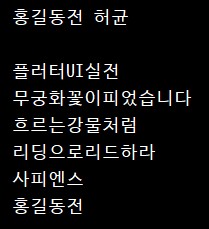
        String title9 = books[9].getTitle();
        String autor9 = books[9].getAuthor();

        System.out.print(title9 + " "); // 홍길동전
        System.out.println(autor9); // 허균
        System.out.println();
        /*
        배열은 반복문과 함께 많이 쓰인다.

        ⭐ 배열의 길이와 안의 요소(elements)는
        꼭 가득 차 있는 것은 아니다.
         */
//        for (int i = 0; i < books.length; i++) {
//            System.out.println(books[i].getTitle()); // 오류 발생: null point exception
//        }
        /*
        TODO 방어적 코드 작성 필요
        만약 배열 안의 요소가 null이 아니라면 출력해
         */
        for (int i = 0; i < books.length; i++) { //🌟모든 not null 요소 출력
            if (books[i] != null) {
                System.out.println(books[i].getTitle());
            } //end of if
        } //end of for
    }//end of main
}//end of class
3. 함수와 메인함수 짜보기
package com.books;
import java.util.Scanner; //스캐너 호출
/**
 * 4.18 5강
 * 배열
 * 실행의 흐름 만들어보기
 * 모든 프로그램의 기본은 CURD이다
 */
public class MyBookStore {
    /*
    샘플 데이터 = 5
    샘플데이터 지우면 인덱스번호 0부터 하면 됨
     */
    //스태틱 변수
    static int currentBookIndex = 6;

    //메인함수
    public static void main(String[] args) {
        //스캐너 준비
        Scanner scanner = new Scanner(System.in);
//        String n1 = scanner.nextLine(); 문자열 스캐너

        //배열 준비
        Book[] books = new Book[100];
//        books = null //배열 삭제방법 - 가리키는 공간이 없다.

        //샘플 데이터 미리 만들어두기
        books[0] = new Book("플러터UI실전", "김근호");
        books[1] = new Book("무궁화꽃이피었습니다", "김진명");
        books[2] = new Book("흐르는강물처럼", "파울로코엘류");
        books[3] = new Book("리딩으로리드하라", "이지성");
        books[4] = new Book("사피엔스", "유발하라리");
        books[5] = new Book("홍길동전", "허균");
        //TODO 추후 삭제하기

        //실행의 흐름을 제어하는 플래그 준비
        boolean flag = true;

        //상수 준비
        final String SAVE = "1";
        final String SEARCH_ALL = "2";
        final String SEARCH_BY_TITTLE = "3";
        final String DELETE_ALL = "4";
        final String END = "5";

        while (flag) {
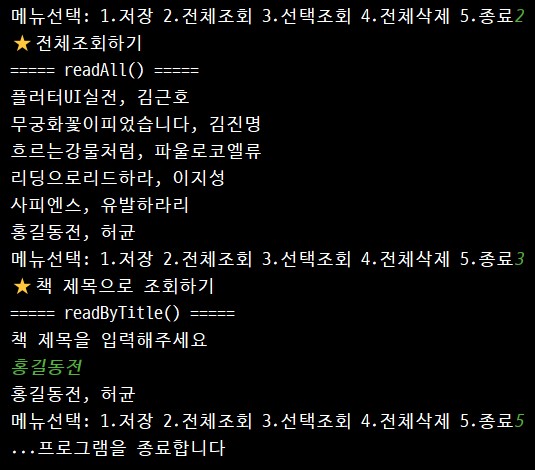
            System.out.print("메뉴선택: 1.저장 2.전체조회 3.선택조회 4.전체삭제 5.종료");
            String selecNo = scanner.nextLine();
            /*
            숫자 비교할 때 ==
            문자열 비교할 때 "문자열"equals("문자열") => true, false

            👍문자열 비교할때는 무조건 equals 메서드를 사용하자
             */
//            if (selecNo == "SAVE") {}
            if (selecNo.equals(SAVE)) {
                System.out.println("⭐저장하기");
                save(scanner, books);

            } else if (selecNo.equals(SEARCH_ALL)) {
                System.out.println("⭐전체조회하기");
                readAll(books);

            } else if (selecNo.equals(SEARCH_BY_TITTLE)) {
                System.out.println("⭐책 제목으로 조회하기");
                readByTitle(scanner, books);

            } else if (selecNo.equals(DELETE_ALL)) {
                System.out.println("⭐전체삭제하기");
                deleteAll(books);

            } else if (selecNo.equals(END)) {
                System.out.println("...프로그램을 종료합니다");
                flag = false; // while(false)가 돼서 종료

            } else {
                System.out.println("💀잘못된 선택입니다 1~5 번호 중에서 선택해주세요");
            }//end of if

        }//end of while

    }//end of main

    //🌟다른 함수를 선언하려면 메인함수 밖에서 해야돼

    //저장하기 함수 - 하나의 Book 객체를 배열에 저장하는 기능
    public static void save(Scanner scanner, Book[] books) {
        System.out.println("===== save() =====");

        // 사용자에게 값을 받아야 한다.
        System.out.println("책 제목을 입력하세요");
        String title = scanner.nextLine();
        System.out.println("책 저자을 입력하세요");
        String author = scanner.nextLine();

        Book book = new Book(title, author);
        // 5, 6, 7...
        // books라는 배열에 book 객체를 저장하는 코드가 된다.
        // 인덱스 번호가 어디까지 사용했는지에 대한 정보도 필요하다
        // 이는 static 변수로 관리한다

        if (currentBookIndex > books.length) {
            System.out.println("더 이상 저장할 공간이 없습니다");
            return;
        }

        books[currentBookIndex] = book;
        currentBookIndex ++;
    }

    //전체 조회하기 함수 - 반복문 필요, 배열 필요
    public static void readAll(Book[] books) { //💀 배열 문법 조심
        System.out.println("===== readAll() =====");
        for (int i = 0; i < books.length; i++) {

            //방어적 코드 작성
            if (books[i] != null) {
                System.out.println(books[i].getTitle() + ", " + books[i].getAuthor());
            }
        }
    }

    //책 제목으로 조회하기 함수
    public static void readByTitle(Scanner scanner, Book[] books) {
        System.out.println("===== readByTitle() =====");

        System.out.println("책 제목을 입력해주세요");

        /*
        문자열 기능 중에 공백 제거 기능이 있다.

        trim(); " " + "문자열" + " "
        앞뒤 공백 알아서 제거
         */

        String title = scanner.nextLine();
        boolean isFind = false;
        /*
        찾는 기능을 만들어줘야 한다.
        [] * 100 다 확인 필요
         */
        for (int i = 0; i < books.length; i++) {

            // "문자열".equals()

            /*
            💀 null point exception 발생원인
            0~5까지는 잘 돌아가는데
            6에서 null 값을 만나서 터진다

            TODO 방어적 코드 작성 필요
             */

            if(books[i] != null) { // 방어적 코드 - not null에만 실행

                // title.trim() => 양끝단의 공백 제거
                if (books[i].getTitle().equals(title.trim())) {

                    //찾았다면 출력해
                    System.out.println(books[i].getTitle()+", " + books[i].getAuthor());

                    //찾았으니 그만해
                    isFind = true;
                    break;
                }
            }

        }//end of for
        // 반복문 100번 돌려도 못찾으면 나오는 문구
        // isFind = false
        if (!isFind) {
            System.out.println("💀 해당 책은 존재하지 않습니다.");
        }
    }

    //전체 삭제하기 함수 - 배열안에 담긴 Book 객체를 전부 null 처리
    public static void deleteAll(Book[] books) {
        System.out.println("===== deleteAll() =====");

        // 전체 삭제 중
//        books = null; => 배열 공간 자체를 없애버림
//        books[0] ~ books[100] = null; => 각각의 값을 null 처리

        for (int i = 0; i < books.length; i++) {
            books[i] = null;
        }
    }

}//end of class
'Java' 카테고리의 다른 글
| 실수) sysout 안에 sysout을 넣어 발생한 오류 (0) | 2025.04.18 |
|---|---|
| 배열 Array 을 활용한 전화번호부 만들기 (0) | 2025.04.18 |
| 멤버변수 생성자 메서드 활용한 스타크래프트 놀이 v.1 (1) | 2025.04.17 |
| 배열 array (0) | 2025.04.17 |
| static 변수 개념 (0) | 2025.04.17 |


