ch16
폰트 속성
font properties
family, size, weight
style, height..
font(family, size, weight..) 단축속성
웹폰트
pc에 폰트가 없으면?
구글폰트
예제)
html 구문
<body>
<h1>나는 기본 폰트야</h1>
<!-- 모든 브라우저는 자체 기본 폰트 스택을 보유했다 -->
<h1 class="gaegu">안녕 나는 gaegu 폰트야</h1>
<h2 class="roboto">안녕 나는 roboto 폰트야</h2>
<p class="sunflower">안녕 나는 sunflower 폰트야</p>
</body>
구글웹폰트 링크
<link
rel="stylesheet"
/>
클래스별 폰트 스타일 정의
.gaegu {
font-family: "Gaegu", sans-serif;
font-weight: 400px;
font-size: 24px;
}
.roboto {
font-family: "Roboto", sans-serif;
font-weight: 700;
font-style: italic;
font-size: 28px;
}
.sunflower {
font-family: "Sunflower", sans-serif;
font-weight: 500;
font-size: 20px;
}
결과

예제2)
html 구문
<body>
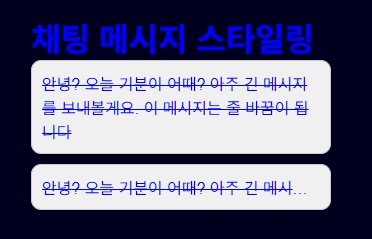
<h1>채팅 메시지 스타일링</h1>
<div class="chat-message message-normal">
안녕? 오늘 기분이 어때? 아주 긴 메시지를 보내볼게요. 이 메시지는 줄 바꿈이 됩니다
</div>
<div class="chat-message message-nowrap">
안녕? 오늘 기분이 어때? 아주 긴 메시지를 보내볼게요. 이 메시지는 줄 바꿈 없이 ..으로 표시됩니다
</div>
</body>
스타일
body{
padding: 40px;
font-family: Arial, sans-serif;
}
.chat-message{
width: 300px;
border: 1px solid #ccc;
padding: 10px;
margin-bottom: 10px;
background-color: #f0f0f0;
border-radius: 10px;
text-decoration: line-through;
}
.message-normal{
/* 공백 또는 줄바꿈: 기본값 */
white-space: normal;
}
.message-nowrap{
/* 공백 또는 줄바꿈: 기본값 */
white-space: nowrap;
/* overflow 속성이 들어가야 textoverflow가 적용된다 */
overflow: hidden;
text-overflow: ellipsis;
}
결과
'HTML CSS' 카테고리의 다른 글
| html/css) 플렉스 flex (2) | 2025.06.04 |
|---|---|
| html/css) 포지션, 트랜지션 (1) | 2025.06.04 |
| html/css) 디스플레이 display 속성, 인라인 inline & 블록 block (0) | 2025.06.03 |
| html/css) background 배경 관련 주요 속성 (0) | 2025.06.03 |
| html/css) 박스모델이란 (0) | 2025.06.03 |


